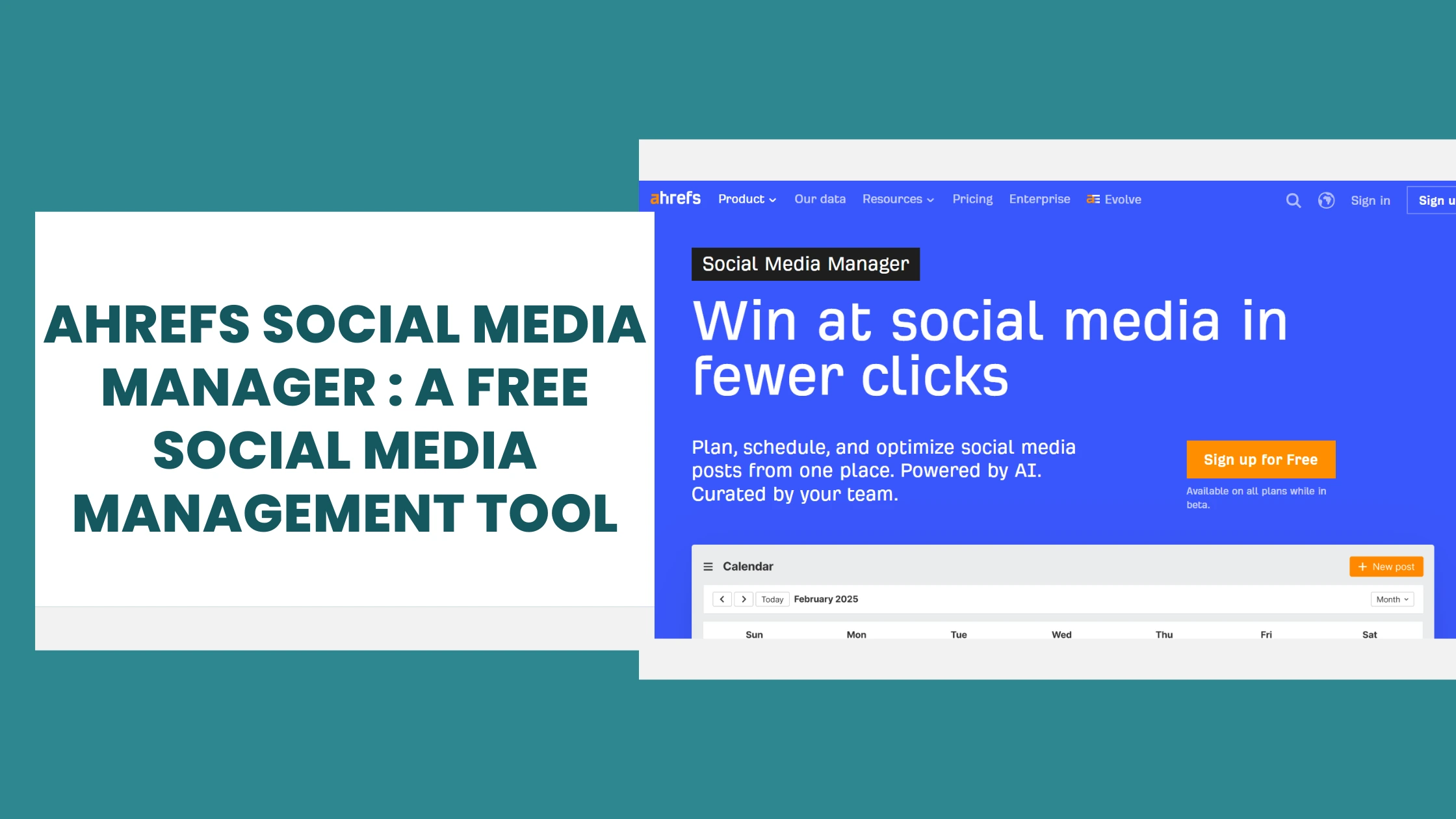
Does this happen with you too? You wake up, don’t even want to eat, and the first thing you do is “schedule today’s Instagram post, update LinkedIn, and post on the Facebook page.” I was living this exact nightmare for months.
I already use Ahrefs for my blog’s SEO work, right? Check backlinks from Site Explorer, do keyword research from Keywords Explorer, see where the positions have gone from Rank Tracker… all in one dashboard. Then one day, while poking around my Ahrefs dashboard, I noticed something new: “Ahrefs Social Media Manager Tool”. I literally stared at my screen and said, “When did this arrive?”
I had been paying for Buffer separately. Buffer is a decent tool, it is not bad, but the idea of managing my social scheduling inside the same platform where I do all my SEO? That was genuinely exciting. So I dropped Buffer for a month and went all-in on Ahrefs Social Media Manager. Here is my honest, unfiltered experience.
What is Ahrefs Social Media Manager?
If you are hearing about this for the first time, let me break it down simply. Ahrefs Social Media Manager is a social media scheduling and analytics tool built directly inside the Ahrefs dashboard. No separate login, no new subscription, no extra tab.
Think of it like this: You ordered food on the Swiggy app, so you also found Instamart there for groceries. Same vibe. Ahrefs is already your SEO home, and now they have added social media management to the same house.
Currently, the tool supports four platforms: Facebook Pages, Instagram, LinkedIn, and X (Twitter). You can schedule posts, see post previews before publishing, track performance metrics, use AI-powered writing suggestions, and manage a full content calendar.
The best part? It is currently in BETA and completely FREE on all Ahrefs plans, including the free plan. Whether you are paying for Lite, Standard, or Advanced, or using the free account, you get this feature at no extra cost.
Note: For freelancers and solo bloggers who are tired of juggling multiple tools, this is one of the genuinely useful free social media management tools available right now especially if you are already inside the Ahrefs ecosystem.
How do set up ? (Step-by-Step)
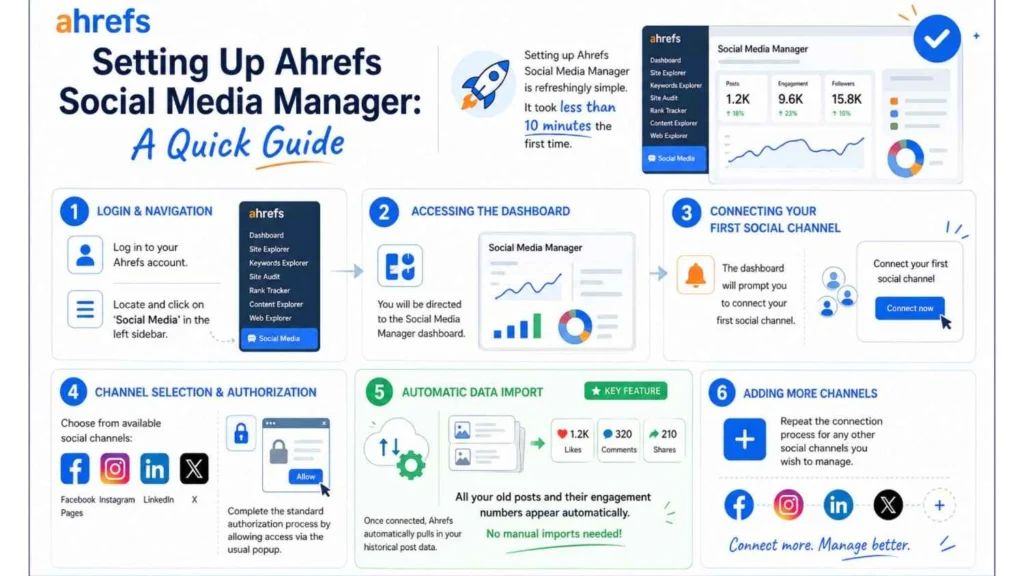
Setting up Ahrefs Social Media Manager is refreshingly simple. Mujhe pehli baar mein 10 minutes bhi nahi lage.
- Log in to your Ahrefs account and look for “Social Media” in the left sidebar.
- Click on it and you’ll land on the Social Media Manager dashboard. It will prompt you to connect your first social channel.
- Choose from Facebook Pages, Instagram, LinkedIn, or X. Each requires the standard authorization the usual “Allow access” popup.
- Once connected, here’s the cool part: Ahrefs automatically pulls in your historical post data. All your old posts, their engagement numbers they just appear there. No manual imports, no temporary solutions.
- Repeat for any other channels you want to manage.
My personal experience: LinkedIn connection was smooth. Instagram took one extra step because of Meta’s permissions setup, but nothing too complicated. Once connected, everything was visible on a dashboard. Honestly, that was a great experience.
Its Features I actually liked
1. Calendar View
The calendar view shows all your scheduled and published posts in a visual monthly grid. You can see at a glance when there is post, when there is gap, when you are over-posting. For a solo blogger with no dedicated social media manager (because there is no budget, we all know), this kind of visual planning is a lifesaver.
I used to keep a manual Google Sheet for content planning. That Sheet had more color codes than a Holi celebration. The calendar view replaced all of that.
2. Drag and Drop Scheduling
You can drag a post from one day to another on the calendar. No re-typing, no re-scheduling through menus. Just drag and drop. Small feature, but it saves so much frustration when you’re reshuffling your content plan at 11 PM.
3. AI Writing Assistant
Ahrefs has added AI-powered writing suggestions inside the post composer. You type a rough idea, and the AI helps polish the caption. It’s not ChatGPT-level deep, but for quick social captions, it genuinely speeds things up.
I used it once when I needed a LinkedIn hook for a new blog post but my brain was empty. The AI gave me three variations, I tweaked the second one, and posted. Done in 3 minutes instead of 15.
4. Post Previews
Before publishing, you can see exactly how your post will look on each platform. Post preview sounds like a small thing, but I realized that embarrassing moment when the image is cropped on LinkedIn the wrong way. This feature prevents that. The preview is platform-specific, so LinkedIn looks like LinkedIn and Instagram looks like Instagram.
5. Historical Data Sync
Once you connect your accounts, Ahrefs automatically pulls historical post data. You can see how older posts performed without lifting a finger. For me, this helped me understand which types of posts had worked on my LinkedIn in the past turns out “beginner mistake” posts got way more engagement than “tips and tricks” posts. Good to know.
6. Auto-Publish First Comments
This is a sneaky-good feature, especially for LinkedIn. You can auto-publish a first comment along with your post. Why is this useful? Because on LinkedIn, adding your blog link in a comment (instead of the post itself) often gets better reach. Ahrefs lets you schedule both the post and the first comment together. Set it once and forget it.
7. Analytics: Views, Likes, Shares, and Time Charts
The analytics section gives you views, likes, shares, and time-based charts for your posts. You can see which day and time your audience is most active. The data is clean and easy to read, not buried under 15 sub-menus like Hootsuite sometimes feels.
It is not as deep as a dedicated analytics tool, but for a solo blogger tracking their own content? More than enough. Also, failed posts are clearly flagged. Buffer once silently failed me, and I didn’t even realize it. Ahrefs shows that clearly.
What is missing in Ahrefs social media manager? (Honest Criticism)
- No Pinterest, YouTube Shorts, or Threads support yet. If Pinterest is your main traffic driver, you’ll still need a separate tool for those platforms.
- Still in BETA, which means occasional bugs. I had one instance where a scheduled post showed as “failed” but had actually published. Ahrefs is actively fixing these, but be aware.
- Analytics are still developing. Compared to dedicated tools like Buffer or Hootsuite, the depth of analytics is limited. If you need UTM tracking, demographic breakdowns, or competitor benchmarking, you’ll need something more specialized.
- No mobile app integration for Social Media Manager specifically. The social features are more desktop-focused right now.
This is all honest feedback. But its a Beta version so some things will be missing.
Comparison: Ahrefs Social Media Manager vs Buffer vs Hootsuite
For any freelance social media manager or solo blogger evaluating tools, here’s a side-by-side breakdown:
| Feature | Ahrefs SMM | Buffer | Hootsuite | Free Plan? | SEO + Social |
| Platforms | FB, IG, LinkedIn, X | FB, IG, LinkedIn, X, Pinterest | 10+ platforms | Ahrefs: Yes (all plans) | Ahrefs only |
| Scheduling | Drag & drop calendar | Calendar + queue | Calendar + bulk | Buffer: 3 channels | No |
| Analytics | Views, likes, shares, time charts | Solid metrics | Detailed reports | Hootsuite: Limited | No |
| AI Writing | Built-in suggestions | AI Assistant | OwlyWriter AI | – | – |
| Pricing (starter) | Free (beta) | $5/channel/month | $99/month | – | – |
| Best For | Solo bloggers + freelancers on Ahrefs | Small teams, agencies | Larger teams/enterprises | – | – |
Takeaways:
- If you are already on Ahrefs for SEO, Social Media Manager is a no-brainer addition.
- Buffer is better for teams who need broader platform support including Pinterest.
- Hootsuite makes sense for larger operations with bigger budgets and bigger teams.
Who is this tool best suited for?
Great fit:
- Solo bloggers managing their own social presence on 2–3 platforms.
- A freelance social media manager handling 2–3 clients’ accounts, you can connect multiple accounts from different clients within the same Ahrefs dashboard.
- Small business owners who already use Ahrefs for SEO and want to avoid paying for yet another tool.
- Beginner bloggers on a tight budget who want one of the free social media management tools that actually comes with real SEO firepower alongside it.
Not the right fit (yet):
- Large agencies handling 20+ clients across 6+ platforms. You need something more robust like Hootsuite or Sprout Social.
- Creators who rely heavily on Pinterest or YouTube Shorts for traffic platform support is limited for now.
My Personal Thought and Recommendation
Is Ahrefs Social Media Manager a perfect tool? No. Is it a genuinely good tool for solo bloggers and freelancers, especially those already on Ahrefs? Absolutely yes.
The fact that it is free during beta, built inside a platform you’re already paying for (or using for free), and does the core scheduling and analytics job well, is genuinely valuable. Paying separate per-channel charges for Buffer, or $99+/month for Hootsuite, would be money better spent.
For my own workflow, it has simplified things noticeably. Manage SEO and social scheduling in one dashboard. No switching tabs, no juggling subscriptions.
My recommendation: If you are already using Ahrefs, you definitely have to give the Social Media Manager a try. It’s completely free while in beta absolutely no risk involved.
If you are not on Ahrefs yet, no problem just create a free account. The Social Media Manager is available there as well. You’ll get access to SEO tools along with it, too. It’s a win-win.
The link is below. Go ahead and give it a try. And make sure you brew your tea first.
FAQs
Q1. Is Ahrefs Social Media Manager really free?
Yes, it is currently free for all Ahrefs users, including free plan users, while it is in beta. There is no separate charge. You simply log in to your Ahrefs dashboard and access it from the sidebar. Once the beta ends, pricing may change, but for now it is completely free.
Q2. Which social media platforms does it support?
As of now, it supports Facebook Pages, Instagram, LinkedIn, and X (Twitter). Pinterest, YouTube Shorts, and Threads are not yet supported. If those platforms are important to you, you may need a secondary tool.
Q3. Can a freelance social media manager use Ahrefs SMM for multiple clients?
Yes. You can connect multiple social accounts from different clients within the same Ahrefs dashboard. It’s a solid fit for a freelance social media manager handling 2–3 clients. For larger-scale agency work with many clients, a dedicated agency tool may serve you better.
Q4. How does it compare to Buffer?
Buffer has broader platform support (including Pinterest) and is a more mature product. Ahrefs Social Media Manager wins on price (free vs. Buffer’s per-channel paid plans), and uniquely combines social scheduling with full SEO tools in one dashboard. If you’re already on Ahrefs, it’s hard to beat.
Q5. Do I need to know SEO to use Ahrefs Social Media Manager?
Not at all. The social media scheduling part works independently of Ahrefs’ SEO tools. You can use it just like any other social scheduler without touching SEO features. But having both in one place is a nice bonus if you decide to explore keyword research and backlink tracking later.
Q6. Is this one of the free social media management tools worth using in 2026?
For bloggers and freelancers already on Ahrefs, yes it’s one of the most practical free social media management tools available right now because it doesn’t exist in isolation. You get scheduling, analytics, AI writing help, and full SEO tools all under one roof, without paying extra.
Our Sources and Citations
- Ahrefs Official Website
- Ahrefs Social Media Manager feature documentation
- Ahrefs Changelog
- Buffer Pricing Page
- Hootsuite Pricing Page
Disclaimer: This article contains affiliate-style recommendations for Ahrefs. All opinions are based on personal use and honest experience. Tool features and pricing mentioned were accurate at the time of writing. Please verify current details at ahrefs.com.
If you want to know about what content marketing is, then explore our content marketing guide here,
What is Content Marketing? A Simple Guide for Indian Small Business Owners (2026)
Upcoming Post: Best Content Marketing Tools for Solo Bloggers in India 2026

Unnati is a content writer and researcher based in Gwalior, Madhya Pradesh (India). She is the founder and sole creator of TeerthaTech, where she researches and publishes informational content on content marketing tools and strategies for Indian small business owners, bloggers, and freelancers. While not a certified marketing professional, her work focuses on honest research, clear explanations, and transparent content practices to help readers make smarter decisions about the tools they use.